I have been reading these articles on Orca with interest. Thank you for the well thought out articles with a good mix of criticism. It seems, as it often does, that software is a lot harder to get right than hardware. I really hope that Orca will be able to improve their product.
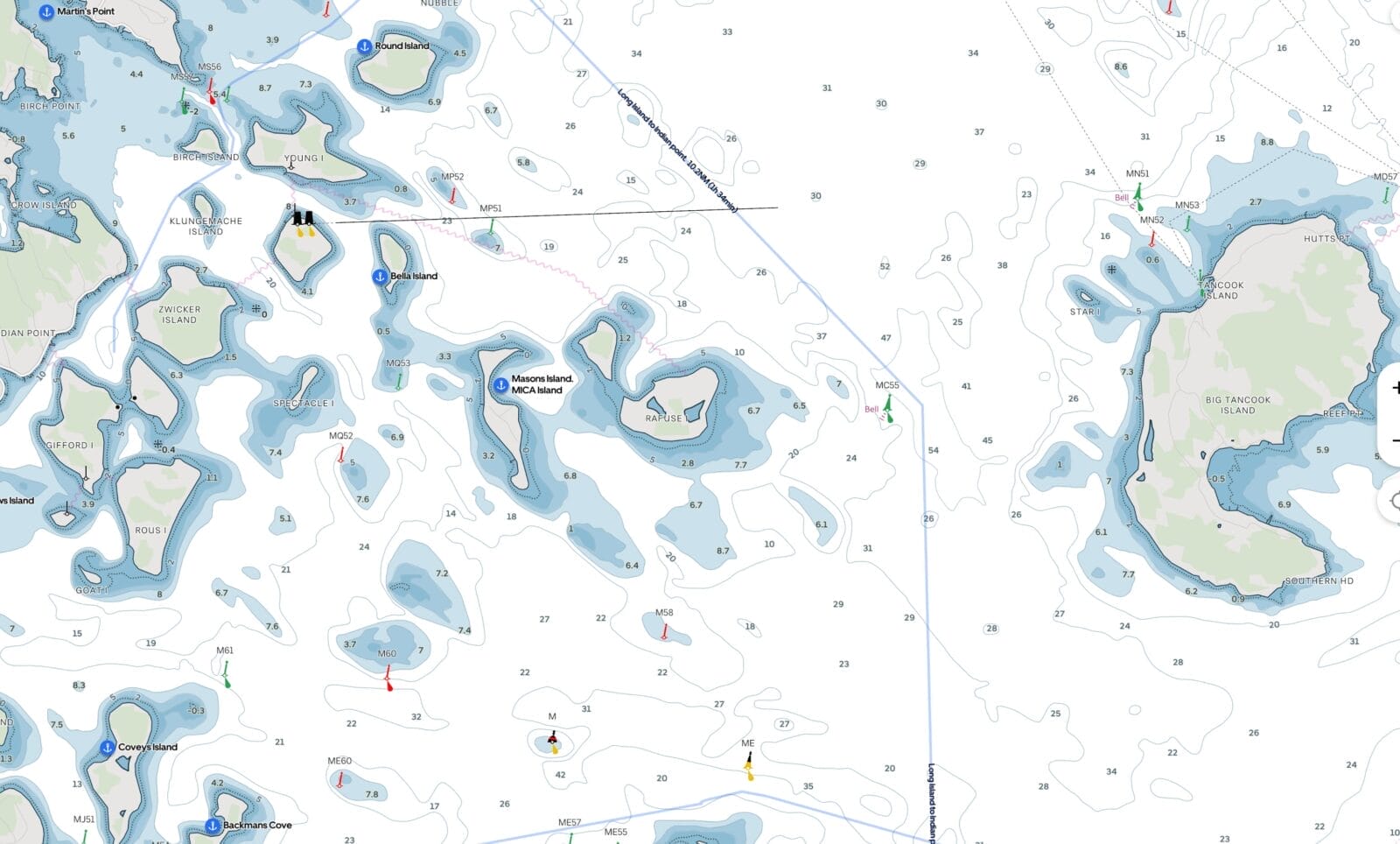
My main interest in trying their app was to see their charts, and unfortunately, this left me quite disappointed. The lack of detail is almost at a level of concern for use in coastal navigation.
I am most interested in the Waddenzee, in the North of the Netherlands. For this region, Rijkswaterstaat has free downloadable charts that are excellent, very detailed, and constantly updated. Rijkswaterstaat runs drones that constantly measure the depths for this region. The Orca website claims they use these charts for their app, but the detail seems to be completely lost.
I have Raymarine on board with the Navionics charts, which also runs on the iPad, and those charts are merely okay. When anchoring in one of the many very shallow regions of these seas, or navigating one off the many narrow channels, the detailed information about the local depth is very nice to have. These details are not that great in Navionics, but worse in Orca.
I have had some success running the charts from Rijkswaterstaat on OpenCPN, which (as you have mentioned before) is a bit of a hack (i.e. major Geek territory: sharing the screen from the Raspberry Pi via VNC on the iPad so I can see the chart in the cockpit).
I also compared the charts for Norway, which should be Orca’s home waters, and there the details were not great either.
So I agree with you that Orca would hugely benefit from better charts, opening up to other charts, and further improvements in their software.
Tom Borgstrom
December 29, 2025 12:04 pm
I recently installed an Orca Core 2 as a backup navigation device, and to enable exploration of instrument-connected, tablet-based navigation alternative to Navionics on my iPad.
I’ve had it installed for a week or so, and have not really used it under sail. One thing that I did notice is that integration with B&G Halo 20+ radar (via Ethernet) is problematic. In some modes it seems to work fine, closely matching what I see on my Zeus 3S plotter. But in other modes it either displays nothing, or some distorted, low-resolution representation of the radar data – see attached photos. I’ve reported this to Orca, but have not received a response yet.
Overall, I’m impressed with the package and think it has a lot of promise. One pleasant surprise – with Starlink left powered on the boat when I am away I can still use the Orca app remotely and monitor this ships location and data. The ability to see actual wind speed/direction at the boat from home was quite reassuring during last week’s storms that blew through the area.
That said, as you point out, the radar is even more useless than I detailed there due to bugginess. Right now my thinking is that, given that I don’t think Orca will ever be a substitute for a full function radar display with collision avoidance, Orca would be best off to scrap the whole radar idea and put their energies into other things.
I intend to disconnect Orca Core from my radar for next season. Just not enough benefit to justify the risk of causing problems with a mission critical system.
Jordan Bettis
December 29, 2025 2:56 pm
I see the marine traffic stuff as being worse than useless. AIS is supposed to be a short-range onboard collision avoidance system.
But if your plotter is downloading data from marine traffic and displaying it as if it is coming from you onboard receiver then this may mask problems with your equipment while you’re sailing near civilization that you will only discover when going offshore.
Further lower-information sailors may think that they “have AIS” when nothing’s been installed or properly connected.
Yes, I would agree with both those points. At the very least targets that are derived from marine traffic should clearly show that, and they don’t until we click on them.
I’ve come across people who genuinely believe that “AIS class B relies on shore stations, while AIS class A uses shore stations and satellites.” At no point were they ever taught the truth, i.e. that AIS is a self-organized protocol using line of sight VHF radio, and that the difference between A and B is about update rates, prioritization, and regulatory compliance. Shore stations and satellites are just a supplemental monitoring network for AIS ship broadcasts, not a core part of the system.
We can solve those kinds of problems with education. But designing apps in a way that makes the problem worse is really not helpful.
Robert Newman
December 30, 2025 1:56 am
Veeery useful.
I’m waiting with bated tablet for TZ Android. Or whatever it’s going to be called. I find it interesting and puzzling that Apple has no interest in tablet usages that require a rugged tablet.
Edouard Lafargue
December 30, 2025 4:29 am
Very insightful comments as usual!
Your bug reports definitely match what I have seen on our own use – definitely not a system for people who rely too much on their plotter and forget to look around 🙂
I do like the sailing autorouting, not for the precise routes which can be hit or miss or just plain nonsensical, but rather, as you pointed out, to get a quick estimate of how long it will take to get somewhere, those estimates were surprisingly usable almost every time I tried them.
Hopefully, Orca will continue to make their app evolve quickly and in the right direction in 2026, I just hope they have the development team, resources and vision to make it… and that they don’t get bought by Garmin or Navico and snuffed out if they start to see them as a threat…
Ramon Pla
January 1, 2026 3:47 pm
I recently came across Zora and it appears to be the open solution Orca needs to become. Questions remain as far as chart compatibility. I’ve found that Aqua Map charts are used but no information about compatibility with others.
Yes, they actually approached me a few months ago to promote it but I said no because it’s still in development. You will note you can’t even buy the hardware yet:https://www.inav4u.com And they want us to pay up front for something that may get delivered someday. They claim this January, but who knows.
Point is that sure it’s a very slick web site with a lot of claims, but reality will probably lag even more than Orca because they are trying to do even more. At least Orca has been shipping hardware for a couple of years and has been through two versions of their hardware. Easy to build a web site, hard to build a fully functioning bug free product.
I hope they make Zora work. If they can actually implement all their wish-list items then it could be amazing.
I think they’re going to run into the same issue that Orca has, specifically: Writing proof-of-concept software that’s 80% of the way there is easy; writing good and reliable software that’s >95% of the way there is damned hard.
People often look at the productivity of three software engineers hacking together a proof-of-concept in two weeks and think that this productivity will scale to a full team and a full product. But that’s not how it works. As you grow, you find that deciding exactly what to build and why takes time; if you just ‘wing it’ you end up with unmaintainable stuff whose architecture doesn’t work for the next feature you decide to add. You need testing – not just an intern poking at the UI; you need a full suite of automated tests at various levels of integration. You need to test every new version of the software on every version of the hardware. You need support, documentation, tutorials, sales channels. You need to negotiate licensing deals for chart data and other things you can’t provide on your own. You need administrative support for all of that. And, as you grow, the tolerance for things that break goes down. Your early-alpha release that’s only distributed to 20 friends can crash with few real consequences. If TimeZero were to release a version of iBoat that breaks the course overlay plotting for 40,000 loyal users then that’s a million-dollar problem. So all the development practices have to be stepped up accordingly.
I used to run a bespoke software shop and I totally agree. Our software was simpler than charting (accounting) but the same issues apply.
Added to your very good points, I used to tell my customers I can give you 80% of what you want for $50k, 90% for a million, 95% for 10 million, and 100% does not exist. The point being that both Orca and Zora are trying to give everyone 100% but compete with TimeZero who only do one thing well. That’s a hard road to travel.
After first me, and then Matt, expressed concern about whether or not Zora 3.0 was a real product, I head from Brenda Robinson, COO at iNav4U with some assurances. I particularly like that she did not go off at me, as so often happens with vendors if I don’t swoon in rapture over their offerings.
Over to Brenda:
Versions 1.0 and 2.0
Both were sold commercially and are in active use. They were not prototypes.
Zora began life onboard our own boat in 2015 while Olivier and I were full-time cruisers. We lived aboard for over a decade and built the system first and foremost to solve problems we personally experienced offshore and at anchor.
In 2022, we incorporated and formally launched Zora 1.0 (then branded Wayfinder). Its focus was deliberately on everything chartplotters didn’t do—or didn’t do well: vessel systems awareness, automation, logging, alerts, and lifecycle management. That product was adopted by early-adopter cruisers and validated the architecture and core concepts.
Zora 2.0 was a major maturation step. We built out a full cloud architecture that allowed us to remotely support vessels, push updates, deploy fixes, and troubleshoot systems without being onboard. This proved transformative for both us and our customers and is now a core part of how Zora operates. Customer feedback was overwhelmingly positive, with the most consistent request being: “We want this at the helm too.”
That feedback forced a strategic decision whether we were prepared to truly compete for helm real estate traditionally owned by chartplotters. After careful consideration (and a chance meeting with Aqua Map at Annapolis), we decided the architecture was strong enough and the market ready.
Zora 3.0
The past year has been spent building out full navigation capability and closing the remaining gaps required for helm use, while staying true to our open-protocol philosophy.
Zora supports multiple chart sources in the same way it supports vessel data: openly and flexibly. We host and continuously scan for updates to OpenCPN, Chart Locker, NOAA, O-Charts, and others—making them freely available for download. Aqua Map charts are also available via subscription, and we are currently working with Skippo SE to bring their charts and routing to the Nordic region.
Field testing and maturity
We currently have 15 full-time cruising boats around the world acting as long-term beta vessels. New features are deployed to these boats first, feedback is gathered, issues resolved, and only then are features rolled into general releases. Some of these vessels have been running Zora continuously for years.
This is not a “finished” product, nor should it be, but it is a stable, proven, and continuously evolving platform. Updates are delivered remotely, much like a phone or computer OS.
Commercial reality
Next week we are launching our dealer program, onboarding dealers in New Zealand, Australia, Croatia, Canada (Toronto), and across the U.S. (Florida, Georgia, Rhode Island, and California). We are also finalizing our first international subsidiary in Norway, which will support dealers across Norway, Sweden, Finland, Denmark, and Iceland.
Our roadmap includes rules-based AI today, with machine learning and agent-based systems planned as data volume grows. We see Zora not as a device, but as an operating system for yachts, updated continuously, supported remotely, and designed to scale over the life of the vessel.
I hope this provides reassurance that Zora is very much a real, mature, and globally deployed product, built by cruisers, tested offshore, and now scaling carefully with professional support behind it.
Thank you again for the opportunity to clarify, and I would genuinely enjoy continuing the conversation when it suits you.
See a response from Zora attached. While I was dealing with that I dug a bit deeper into the Zora product and while there are some similarities it’s rather different from Orca. Most notable, at least as I understand it, Zora gathers information from existing systems on the boat, whereas Orca Core adds both compass and GPS and then pulls data together from other gear.
I also would not say that Zora is any more an open system that Orca is, at least in the sense that I used the term above to mean that the system would provide data over WiFi or Ethernet to our navigation system of choice. But I will check on that with Brenda.
I asked and got a very long answer from Brenda, but the short answer is that no, Zora is not open in the way I defined it in the Orca review Part 3.
Carl Damm
January 3, 2026 5:41 pm
I wonder if Orca could access greater detailed charts the same way that SailGrib does: the end user enters their own subscription information and the charts down load into SailGrib. (Navionics)
I concur that the best solution would be for Orca to open up their data stream to feed thier system data openly to other apps. They are sell terrific hardware that many will by with or without the Orca App.
That would be a great solution if they could figure out the licensing. I think the underlying problem might be that the two most mature chart folios, C-Map and Navionics, are now owned by plotter makers (Navico and Garmin) so there is a huge conflict of interest here and may even be that those incumbents are withholding charting in an attempt to cut off Orca’s oxygen. It’s interesting to note that as at today neither of those folios are available for any tablet navigation software. Time for the trust busters to step up!
The Navionics situation has become quite bad. Their data is by far the best, around here – there are plenty of lakes where Navionics has every single <2m depth rock charted well enough to bulls-eye it with a JDAM, while everyone else's charts and the government charts just show "Lake, blue, probably about 200 to 400 m wide, somewhere over here." But Garmin has been getting very customer hostile. Their recent price hikes I might tolerate – but their phone/tablet app doesn't allow spare devices anymore. If my primary iPad goes dead then I have to de-register either it or my phone from the account before I can enable the spare iPad and download charts onto it. Real easy to do mid passage without internet.
And they like it that way. They like their lock-in. They don't want to license that data, not when it's a selling point for $12,000 plotter systems that are too poor a value proposition to sell themselves without it.
What I'd really like to see is national hydrographic offices stepping up with S-57 / S-100 data at the same quality. (S-63 can go $#&+ itself.) I'd happily pay a $100/year contribution to the CHS to support open non-DRMed data at a Navionics level of detail.
Sorry to hear that Garmin are making the Navionics app device specific, rather than user specific, that really is grasping. TZiboat is still user specific, so runs on all my ithings, but, as you and I have pointed out the charts are not as complete. Not sure what the answer is, other than an antitrust case, which will likely never happen.
I can’t see CHS getting into charting areas that are not used by the commercial guys.
A Navionics account is still linked to a user, not to a device – but you are now allowed only one active and one spare device. If the active device runs out of battery, is dropped overboard, etc. you can switch to the existing spare, but you cannot provision a new spare or download the gigabytes of chart files to it without first de-provisioning the old primary and erasing the charts from it.
Which kind of defeats the entire point of the Navionics app, i.e. that you have the same charts and routes synced on all the ipads and phones aboard so that you can quickly swap between them if one fails….
I have been reading these articles on Orca with interest. Thank you for the well thought out articles with a good mix of criticism. It seems, as it often does, that software is a lot harder to get right than hardware. I really hope that Orca will be able to improve their product.
My main interest in trying their app was to see their charts, and unfortunately, this left me quite disappointed. The lack of detail is almost at a level of concern for use in coastal navigation.
I am most interested in the Waddenzee, in the North of the Netherlands. For this region, Rijkswaterstaat has free downloadable charts that are excellent, very detailed, and constantly updated. Rijkswaterstaat runs drones that constantly measure the depths for this region. The Orca website claims they use these charts for their app, but the detail seems to be completely lost.
I have Raymarine on board with the Navionics charts, which also runs on the iPad, and those charts are merely okay. When anchoring in one of the many very shallow regions of these seas, or navigating one off the many narrow channels, the detailed information about the local depth is very nice to have. These details are not that great in Navionics, but worse in Orca.
I have had some success running the charts from Rijkswaterstaat on OpenCPN, which (as you have mentioned before) is a bit of a hack (i.e. major Geek territory: sharing the screen from the Raspberry Pi via VNC on the iPad so I can see the chart in the cockpit).
I also compared the charts for Norway, which should be Orca’s home waters, and there the details were not great either.
So I agree with you that Orca would hugely benefit from better charts, opening up to other charts, and further improvements in their software.
I recently installed an Orca Core 2 as a backup navigation device, and to enable exploration of instrument-connected, tablet-based navigation alternative to Navionics on my iPad.
I’ve had it installed for a week or so, and have not really used it under sail. One thing that I did notice is that integration with B&G Halo 20+ radar (via Ethernet) is problematic. In some modes it seems to work fine, closely matching what I see on my Zeus 3S plotter. But in other modes it either displays nothing, or some distorted, low-resolution representation of the radar data – see attached photos. I’ve reported this to Orca, but have not received a response yet.
Overall, I’m impressed with the package and think it has a lot of promise. One pleasant surprise – with Starlink left powered on the boat when I am away I can still use the Orca app remotely and monitor this ships location and data. The ability to see actual wind speed/direction at the boat from home was quite reassuring during last week’s storms that blew through the area.
Hi Tom,
Thanks for the report. I delve into both those issues in detail in part three about Core: https://www.morganscloud.com/2025/11/20/orca-navigation-system-review-part-3-core-capabilities-and-uses/
That said, as you point out, the radar is even more useless than I detailed there due to bugginess. Right now my thinking is that, given that I don’t think Orca will ever be a substitute for a full function radar display with collision avoidance, Orca would be best off to scrap the whole radar idea and put their energies into other things.
I intend to disconnect Orca Core from my radar for next season. Just not enough benefit to justify the risk of causing problems with a mission critical system.
I see the marine traffic stuff as being worse than useless. AIS is supposed to be a short-range onboard collision avoidance system.
But if your plotter is downloading data from marine traffic and displaying it as if it is coming from you onboard receiver then this may mask problems with your equipment while you’re sailing near civilization that you will only discover when going offshore.
Further lower-information sailors may think that they “have AIS” when nothing’s been installed or properly connected.
Hi Jordan,
Yes, I would agree with both those points. At the very least targets that are derived from marine traffic should clearly show that, and they don’t until we click on them.
I’ve come across people who genuinely believe that “AIS class B relies on shore stations, while AIS class A uses shore stations and satellites.” At no point were they ever taught the truth, i.e. that AIS is a self-organized protocol using line of sight VHF radio, and that the difference between A and B is about update rates, prioritization, and regulatory compliance. Shore stations and satellites are just a supplemental monitoring network for AIS ship broadcasts, not a core part of the system.
We can solve those kinds of problems with education. But designing apps in a way that makes the problem worse is really not helpful.
Veeery useful.
I’m waiting with bated tablet for TZ Android. Or whatever it’s going to be called. I find it interesting and puzzling that Apple has no interest in tablet usages that require a rugged tablet.
Very insightful comments as usual!
Your bug reports definitely match what I have seen on our own use – definitely not a system for people who rely too much on their plotter and forget to look around 🙂
I do like the sailing autorouting, not for the precise routes which can be hit or miss or just plain nonsensical, but rather, as you pointed out, to get a quick estimate of how long it will take to get somewhere, those estimates were surprisingly usable almost every time I tried them.
Hopefully, Orca will continue to make their app evolve quickly and in the right direction in 2026, I just hope they have the development team, resources and vision to make it… and that they don’t get bought by Garmin or Navico and snuffed out if they start to see them as a threat…
I recently came across Zora and it appears to be the open solution Orca needs to become. Questions remain as far as chart compatibility. I’ve found that Aqua Map charts are used but no information about compatibility with others.
Hi Ramon,
Yes, they actually approached me a few months ago to promote it but I said no because it’s still in development. You will note you can’t even buy the hardware yet:https://www.inav4u.com And they want us to pay up front for something that may get delivered someday. They claim this January, but who knows.
Point is that sure it’s a very slick web site with a lot of claims, but reality will probably lag even more than Orca because they are trying to do even more. At least Orca has been shipping hardware for a couple of years and has been through two versions of their hardware. Easy to build a web site, hard to build a fully functioning bug free product.
I hope they make Zora work. If they can actually implement all their wish-list items then it could be amazing.
I think they’re going to run into the same issue that Orca has, specifically: Writing proof-of-concept software that’s 80% of the way there is easy; writing good and reliable software that’s >95% of the way there is damned hard.
People often look at the productivity of three software engineers hacking together a proof-of-concept in two weeks and think that this productivity will scale to a full team and a full product. But that’s not how it works. As you grow, you find that deciding exactly what to build and why takes time; if you just ‘wing it’ you end up with unmaintainable stuff whose architecture doesn’t work for the next feature you decide to add. You need testing – not just an intern poking at the UI; you need a full suite of automated tests at various levels of integration. You need to test every new version of the software on every version of the hardware. You need support, documentation, tutorials, sales channels. You need to negotiate licensing deals for chart data and other things you can’t provide on your own. You need administrative support for all of that. And, as you grow, the tolerance for things that break goes down. Your early-alpha release that’s only distributed to 20 friends can crash with few real consequences. If TimeZero were to release a version of iBoat that breaks the course overlay plotting for 40,000 loyal users then that’s a million-dollar problem. So all the development practices have to be stepped up accordingly.
Hi Matt,
I used to run a bespoke software shop and I totally agree. Our software was simpler than charting (accounting) but the same issues apply.
Added to your very good points, I used to tell my customers I can give you 80% of what you want for $50k, 90% for a million, 95% for 10 million, and 100% does not exist. The point being that both Orca and Zora are trying to give everyone 100% but compete with TimeZero who only do one thing well. That’s a hard road to travel.
Hi All,
After first me, and then Matt, expressed concern about whether or not Zora 3.0 was a real product, I head from Brenda Robinson, COO at iNav4U with some assurances. I particularly like that she did not go off at me, as so often happens with vendors if I don’t swoon in rapture over their offerings.
Over to Brenda:
Hi Ramon.
See a response from Zora attached. While I was dealing with that I dug a bit deeper into the Zora product and while there are some similarities it’s rather different from Orca. Most notable, at least as I understand it, Zora gathers information from existing systems on the boat, whereas Orca Core adds both compass and GPS and then pulls data together from other gear.
I also would not say that Zora is any more an open system that Orca is, at least in the sense that I used the term above to mean that the system would provide data over WiFi or Ethernet to our navigation system of choice. But I will check on that with Brenda.
Hi Ramon,
I asked and got a very long answer from Brenda, but the short answer is that no, Zora is not open in the way I defined it in the Orca review Part 3.
I wonder if Orca could access greater detailed charts the same way that SailGrib does: the end user enters their own subscription information and the charts down load into SailGrib. (Navionics)
I concur that the best solution would be for Orca to open up their data stream to feed thier system data openly to other apps. They are sell terrific hardware that many will by with or without the Orca App.
Hi Carl,
That would be a great solution if they could figure out the licensing. I think the underlying problem might be that the two most mature chart folios, C-Map and Navionics, are now owned by plotter makers (Navico and Garmin) so there is a huge conflict of interest here and may even be that those incumbents are withholding charting in an attempt to cut off Orca’s oxygen. It’s interesting to note that as at today neither of those folios are available for any tablet navigation software. Time for the trust busters to step up!
The Navionics situation has become quite bad. Their data is by far the best, around here – there are plenty of lakes where Navionics has every single <2m depth rock charted well enough to bulls-eye it with a JDAM, while everyone else's charts and the government charts just show "Lake, blue, probably about 200 to 400 m wide, somewhere over here." But Garmin has been getting very customer hostile. Their recent price hikes I might tolerate – but their phone/tablet app doesn't allow spare devices anymore. If my primary iPad goes dead then I have to de-register either it or my phone from the account before I can enable the spare iPad and download charts onto it. Real easy to do mid passage without internet.
And they like it that way. They like their lock-in. They don't want to license that data, not when it's a selling point for $12,000 plotter systems that are too poor a value proposition to sell themselves without it.
What I'd really like to see is national hydrographic offices stepping up with S-57 / S-100 data at the same quality. (S-63 can go $#&+ itself.) I'd happily pay a $100/year contribution to the CHS to support open non-DRMed data at a Navionics level of detail.
Hi Matt,
Sorry to hear that Garmin are making the Navionics app device specific, rather than user specific, that really is grasping. TZiboat is still user specific, so runs on all my ithings, but, as you and I have pointed out the charts are not as complete. Not sure what the answer is, other than an antitrust case, which will likely never happen.
I can’t see CHS getting into charting areas that are not used by the commercial guys.
A Navionics account is still linked to a user, not to a device – but you are now allowed only one active and one spare device. If the active device runs out of battery, is dropped overboard, etc. you can switch to the existing spare, but you cannot provision a new spare or download the gigabytes of chart files to it without first de-provisioning the old primary and erasing the charts from it.
Which kind of defeats the entire point of the Navionics app, i.e. that you have the same charts and routes synced on all the ipads and phones aboard so that you can quickly swap between them if one fails….